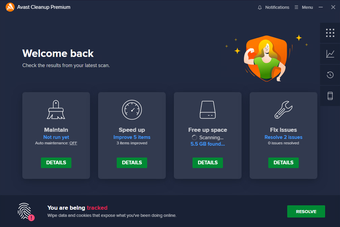
Avast Cleanup is a utility tool that lets users free up disk space and keep their computers running smoothly. It handles routine maintenance by removing unnecessary files, managing applications, clearing browser traces, and limiting background activity. These tools reduce clutter and improve performance.
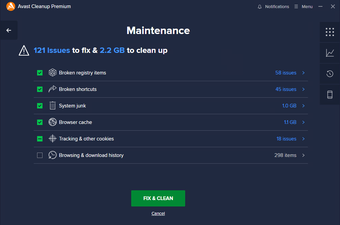
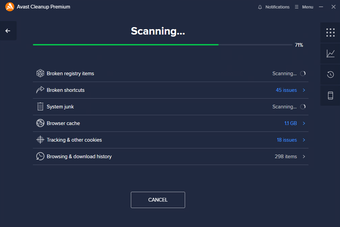
Avast Cleanup’s junk cleaner scans for files that build up during everyday computer use, such as temporary data, app leftovers, and cached files. It then removes them to free up space. It also offers Sleep Mode, which pauses selected programs running in the background. This can free up system resources and make your computer feel more responsive.
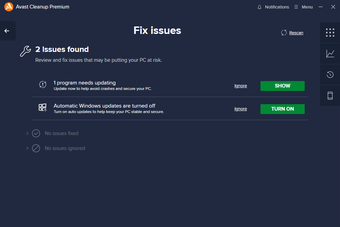
This tool is intended for routine system maintenance, but it’s wise to review its suggestions before applying them. Deleting cookies, saved data, or app files can sign you out of websites or change preferences. Putting background apps to sleep could also disrupt features that rely on them running continuously.
Convenient and easy to use
Overall, Avast Cleanup offers a convenient way to manage junk files, uninstall unwanted apps, and limit unnecessary background activity. Its features make routine maintenance easier to manage, while automatic upkeep options allow users to keep their PC running neatly without having to manage every task themselves.
Pros
Removes unnecessary files to free up disk space
Sleep Mode to reduce unnecessary background activity
Get your PC back in shape by removing the junk files and applications you don’t need or use
The longer you use your PC, the more it will get bogged down by residual files, unused junk data, useless applications, and accumulated browser data. This can rob you of precious bytes that could store photos, games, movies, and more. Reclaim your PC from the data-gobbling menace with Avast Cleanup, the quick, secure way to get your PC running like new. With cleaning, optimization, and scheduling functions, you can give your PC more space, improve performance, and remove potentially dangerous apps. Key Features:ROUND UP JUNK FILES Huge chunks of your data are taken up by useless ‘junk files’ such as software distribution, temporary files, driver packages, system logs, and more. Getting rid of these files can give you a full feature-length movie’s worth of data!SCRUB THAT BROWSER CLEANClear your browsing and download history to erase your presence online, but don’t stop there: You can also erase elements like your browser’s cache, cookies, and tracking cookies — spies that give your browsing data to advertisers. CLEAN YOUR PC AUTOMATICALLYWhy not let us do all the work? Set up schedules for your Cleanup so we can give your PC a much-needed cleaning on a monthly, weekly, or even daily basis to make sure it stays at the top of its game. BOOST YOUR STARTUP TIMEBy adjusting your settings, delaying or disabling any application that tries to boot up with your computer, you can wake your PC up even faster from its power naps.ADD-ON AND SEARCH ENGINE CLEANERIf your browser has an add-on with a bad reputation or an untrusted search engine, you can identify and remove these problem elements and replace them with more trustworthy alternatives. REGISTRY CLEANING, AT YOUR DISPOSAL Your registry is one of the most important parts of your PC — show it a little love by giving it an in-depth cleaning, and free up some space.GET YOUR PC RUNNING ITS BESTSome apps don’t have your best interests in mind. Disable these untrustworthy applications to make your PC safer and perform better. To double down on better performance, you can also tweak system settings to keep things running smoothly.PROTECT YOUR CLEANLINESS — IN REAL TIMEWhen you uninstall a program, it usually leaves leftover files on your machine that don’t really need to be there. Cleanup automatically detects these pesky files and gets rid of them before they can add up.
Laws concerning the use of this software vary from country to country. We do not encourage or condone the use of this program if it is in violation of these laws. Softonic may receive a referral fee if you click or buy any of the products featured here.